04.16.2025
? Client Referral Process Enhancements
To improve how clients and providers connect, we’ve made exciting changes to our referral workflow. Our goal is to match clients with providers within 24 hours of initial contact.
What’s New:
✅ A streamlined referral process
✅ Text message alerts for new referrals
✅ A provider-controlled status for accepting new clients
✅ A centralized wait list for unmatched clients
? Referral Process Breakdown
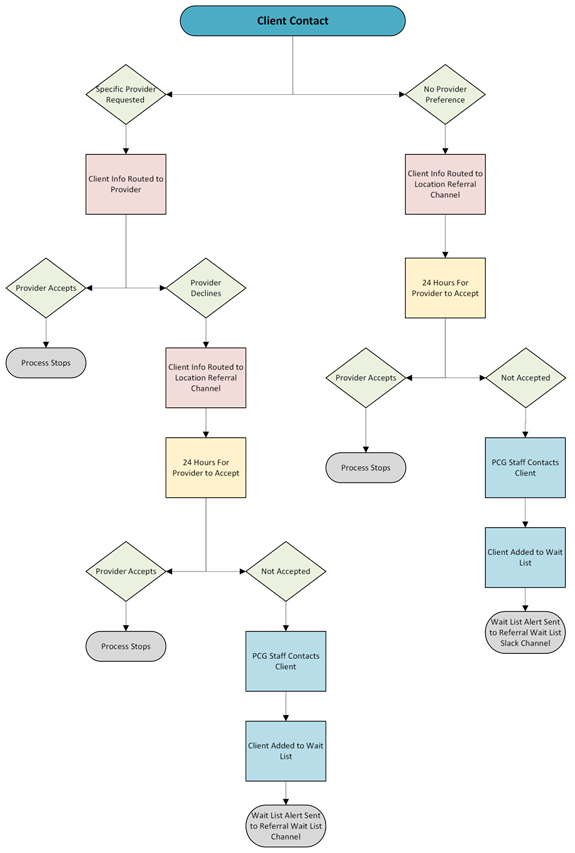
? Client Requests a Specific Provider
- Referral Delivery
- You’ll receive client info via email and Slack Direct Message
- A text alert will notify you of the referral
- To Accept the Referral
- Visit: Referral Update Form
- Search for client by Full Name
- Set Status to “Accept”
- Verify Provider Name
- Click “Accept Referral”
- To Decline the Referral
- Use the same form link
- Change status to Decline
- Select a reason
- Click “Accept Referral” to confirm submission
- If No Action Within 24 Hours:
- Referral auto-declines
- Client receives email notification
- PCG team follows up to assist with placement
? Client Did Not Request a Specific Provider
- Referral is posted in the Slack Location Referral Channel
- Interested providers complete the referral form to Accept
- If declined after contact, providers must update status with Decline reason
Unmatched Referrals:
- Added to Wait List
- PCG staff contacts client for more details (preferences, virtual/in-person, etc.)
- If no match in 24 hours, alert sent to Referral_Waitlist Slack Channel
- Providers can select clients directly from the Wait List
? Client Wait List Access
- Clients not contacted within 48 hours are automatically placed on the Wait List
- Clients highlighted in green = already active with PCG
- Providers may claim clients by selecting their name in the Accepting_Provider dropdown
✅ Provider Action Required
Please take a moment to update your profile:
- Log into the Provider Portal
- Access your Provider Profile
- Set your New Client Status:
- “Accepting New Clients”
- “Not Accepting New Clients”
? Frequently Asked Questions
What does Accepting a Referral mean?
You agree to contact the client and initiate intake.
What does Declining a Referral mean?
You are either unavailable or have spoken with the client and decided not to proceed.
What Slack channels should I follow?
#location_referral(for your primary location)#referral_waitlist
How can I increase my referrals?
- Respond to referrals quickly
- Install Slack & email on your phone
- Enable alerts for new referrals
- Check the Wait List regularly